
Service_Mesh/Istio
[Istio-2주차] Ingress Gateway, Virtual Service (실습)
- -
Istio gateways 와 Virtual Service 실습
- Gateway(L4/L5) , VirtualService(L7)
- Gateway를 통한 액세스: 클러스터 진입 지점 정의 - 외부 트래픽 수용
- VirtualService 를 통한 내부 라우팅: 인입 트래픽을 클러스터 내 서비스(배포)로 라우팅
- 보안: 인입 트래픽 보호 (HTTPS, x.509)
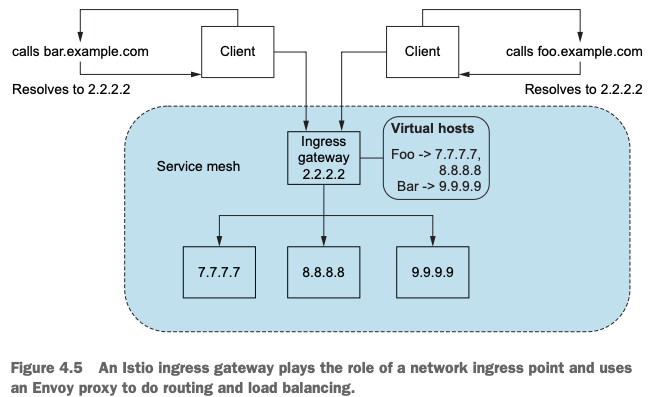
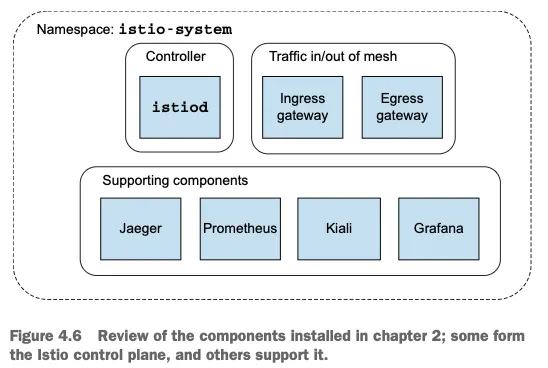
1. Istio Ingress Gateway 구조 이해와 기동 확인
Istio에서는 Ingress Gateway를 통해 외부에서 클러스터로 유입되는 트래픽을 수용한다. (Envoy를 통해 구성됨)
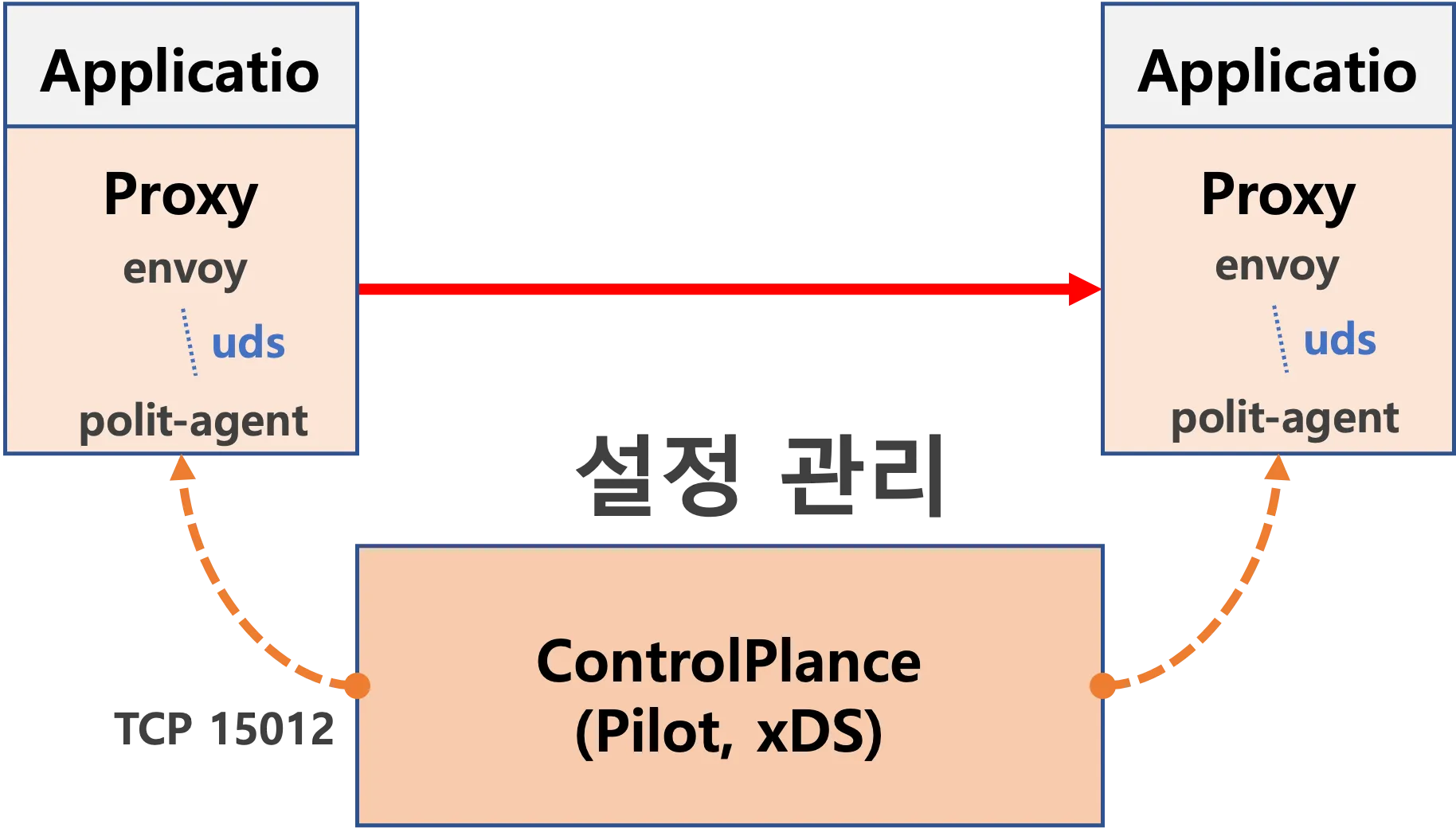
- 실습 환경 재구성
# 제공 예제 파일 clone
git clone https://github.com/AcornPublishing/istio-in-action
cd istio-in-action/book-source-code-master
pwd # 각자 자신의 pwd 경로
code .

# 아래 extramounts 생략 시, myk8s-control-plane 컨테이너 sh/bash 진입 후 직접 git clone 가능
kind create cluster --name myk8s --image kindest/node:v1.23.17 --config - <<EOF
kind: Cluster
apiVersion: kind.x-k8s.io/v1alpha4
nodes:
- role: control-plane
  extraPortMappings:
  - containerPort: 30000 # Sample Application (istio-ingrssgateway) HTTP
    hostPort: 30000
  - containerPort: 30001 # Prometheus
    hostPort: 30001
  - containerPort: 30002 # Grafana
    hostPort: 30002
  - containerPort: 30003 # Kiali
    hostPort: 30003
  - containerPort: 30004 # Tracing
    hostPort: 30004
  - containerPort: 30005 # Sample Application (istio-ingrssgateway) HTTPS
    hostPort: 30005
  - containerPort: 30006 # TCP Route
    hostPort: 30006
  - containerPort: 30007 # New Gateway
    hostPort: 30007
  extraMounts: # 해당 부분 생략 가능
  - hostPath: /root/istio_gasida/istio-in-action/book-source-code-master # 각자 자신의 pwd 경로로 설정
    containerPath: /istiobook
networking:
  podSubnet: 10.10.0.0/16
  serviceSubnet: 10.200.1.0/24
EOF

# 설치 확인
docker ps

# 노드에 기본 툴 설치
docker exec -it myk8s-control-plane sh -c 'apt update && apt install tree psmisc lsof wget bridge-utils net-tools dnsutils tcpdump ngrep iputils-ping git vim -y'

# (옵션) metrics-server
helm repo add metrics-server https://kubernetes-sigs.github.io/metrics-server/
helm install metrics-server metrics-server/metrics-server --set 'args[0]=--kubelet-insecure-tls' -n kube-system
kubectl get all -n kube-system -l app.kubernetes.io/instance=metrics-server
# myk8s-control-plane 진입 후 설치 진행
docker exec -it myk8s-control-plane bash
-----------------------------------
# (옵션) 코드 파일들 마운트 확인
tree /istiobook/ -L 1
혹은
git clone ... /istiobook # 마운트 안한 경우
# istioctl 설치
export ISTIOV=1.17.8
echo 'export ISTIOV=1.17.8' >> /root/.bashrc
curl -s -L https://istio.io/downloadIstio | ISTIO_VERSION=$ISTIOV sh -
cp istio-$ISTIOV/bin/istioctl /usr/local/bin/istioctl
istioctl version --remote=false
# default 프로파일 컨트롤 플레인 배포
istioctl install --set profile=default -y
# 설치 확인 : istiod, istio-ingressgateway, crd 등
kubectl get istiooperators -n istio-system -o yaml
kubectl get all,svc,ep,sa,cm,secret,pdb -n istio-system
kubectl get cm -n istio-system istio -o yaml
kubectl get crd | grep istio.io | sort
# 보조 도구 설치
kubectl apply -f istio-$ISTIOV/samples/addons
kubectl get pod -n istio-system
# 빠져나오기
exit
-----------------------------------
# 실습을 위한 네임스페이스 설정
kubectl create ns istioinaction
kubectl label namespace istioinaction istio-injection=enabled
kubectl get ns --show-labels
# istio-ingressgateway 서비스 : NodePort 변경 및 nodeport 지정 변경 , externalTrafficPolicy 설정 (ClientIP 수집)
kubectl patch svc -n istio-system istio-ingressgateway -p '{"spec": {"type": "NodePort", "ports": [{"port": 80, "targetPort": 8080, "nodePort": 30000}]}}'
kubectl patch svc -n istio-system istio-ingressgateway -p '{"spec": {"type": "NodePort", "ports": [{"port": 443, "targetPort": 8443, "nodePort": 30005}]}}'
kubectl patch svc -n istio-system istio-ingressgateway -p '{"spec":{"externalTrafficPolicy": "Local"}}'
kubectl describe svc -n istio-system istio-ingressgateway
# NodePort 변경 및 nodeport 30001~30003으로 변경 : prometheus(30001), grafana(30002), kiali(30003), tracing(30004)
kubectl patch svc -n istio-system prometheus -p '{"spec": {"type": "NodePort", "ports": [{"port": 9090, "targetPort": 9090, "nodePort": 30001}]}}'
kubectl patch svc -n istio-system grafana -p '{"spec": {"type": "NodePort", "ports": [{"port": 3000, "targetPort": 3000, "nodePort": 30002}]}}'
kubectl patch svc -n istio-system kiali -p '{"spec": {"type": "NodePort", "ports": [{"port": 20001, "targetPort": 20001, "nodePort": 30003}]}}'
kubectl patch svc -n istio-system tracing -p '{"spec": {"type": "NodePort", "ports": [{"port": 80, "targetPort": 16686, "nodePort": 30004}]}}'
# Prometheus 접속 : envoy, istio 메트릭 확인
open http://127.0.0.1:30001
# Grafana 접속
open http://127.0.0.1:30002
# Kiali 접속 1 : NodePort
open http://127.0.0.1:30003
# (옵션) Kiali 접속 2 : Port forward
kubectl port-forward deployment/kiali -n istio-system 20001:20001 &
open http://127.0.0.1:20001
# tracing 접속 : 예거 트레이싱 대시보드
open http://127.0.0.1:30004
# 접속 테스트용 netshoot 파드 생성
cat <<EOF | kubectl apply -f -
apiVersion: v1
kind: Pod
metadata:
name: netshoot
spec:
containers:
- name: netshoot
image: nicolaka/netshoot
command: ["tail"]
args: ["-f", "/dev/null"]
terminationGracePeriodSeconds: 0
EOF
- istio 에서 ingressgateway 동작 확인
kubectl get pod -n istio-system -l app=istio-ingressgateway
Running 상태로 1/1 컨테이너 기동을 확인

proxy 상태 확인
docker exec -it myk8s-control-plane istioctl proxy-status

proxy 설정 확인
# proxy 설정 확인
docker exec -it myk8s-control-plane istioctl proxy-config all deploy/istio-ingressgateway.istio-system
docker exec -it myk8s-control-plane istioctl proxy-config listener deploy/istio-ingressgateway.istio-system
ADDRESS PORT  MATCH DESTINATION
0.0.0.0 15021 ALL   Inline Route: /healthz/ready*
0.0.0.0 15090 ALL   Inline Route: /stats/prometheus*

docker exec -it myk8s-control-plane istioctl proxy-config routes deploy/istio-ingressgateway.istio-system
NAME     DOMAINS     MATCH                  VIRTUAL SERVICE
         *           /stats/prometheus*
         *           /healthz/ready*

docker exec -it myk8s-control-plane istioctl proxy-config cluster deploy/istio-ingressgateway.istio-system
docker exec -it myk8s-control-plane istioctl proxy-config endpoint deploy/istio-ingressgateway.istio-system
docker exec -it myk8s-control-plane istioctl proxy-config log deploy/istio-ingressgateway.istio-system
docker exec -it myk8s-control-plane istioctl proxy-config secret deploy/istio-ingressgateway.istio-system

# 설정 참고
kubectl get istiooperators -n istio-system -o yaml

kubectl exec -n istio-system deploy/istio-ingressgateway -- ps aux

kubectl exec -n istio-system deploy/istio-ingressgateway -- whoami
kubectl exec -n istio-system deploy/istio-ingressgateway -- id
이때 pilot-agent, envoy 프로세스가 정상 기동되고 있었고, 사용자 ID는 istio-proxy로 확인

2. Gateway 리소스 생성 및 적용
Ingress Gateway가 트래픽을 수용하도록 하기 위해서는 Gateway 리소스를 정의해야 한다.
apiVersion: networking.istio.io/v1alpha3
kind: Gateway
metadata:
  name: coolstore-gateway  # (1) 게이트웨이 이름
spec:
  selector:
    istio: ingressgateway  # (2) 어느 게이트웨이 구현체인가?
  servers:
  - port:
      number: 80          # (3) 노출할 포트
      name: http
      protocol: HTTP
    hosts:
    - "webapp.istioinaction.io" # (4) 이 포트의 호스트
이 게이트웨이 리소스 설정은 webapp.istioinaction.io 호스트에 대해 80번 포트를 리스닝하도록 envoy를 설정한다.
리소스 생성 후 확인
# 신규터미널 : istiod 로그
kubectl stern -n istio-system -l app=istiod
istiod-7df6ffc78d-w9szx discovery 2025-04-13T04:50:04.531700Z	info	ads	Push debounce stable[20] 1 for config Gateway/istioinaction/coolstore-gateway: 100.4665ms since last change, 100.466166ms since last push, full=true
istiod-7df6ffc78d-w9szx discovery 2025-04-13T04:50:04.532520Z	info	ads	XDS: Pushing:2025-04-13T04:50:04Z/14 Services:12 ConnectedEndpoints:1 Version:2025-04-13T04:50:04Z/14
istiod-7df6ffc78d-w9szx discovery 2025-04-13T04:50:04.537272Z	info	ads	LDS: PUSH for node:istio-ingressgateway-996bc6bb6-p6k79.istio-system resources:1 size:2.2kB
istiod-7df6ffc78d-w9szx discovery 2025-04-13T04:50:04.545298Z	warn	constructed http route config for route http.8080 on port 80 with no vhosts; Setting up a default 404 vhost
istiod-7df6ffc78d-w9szx discovery 2025-04-13T04:50:04.545584Z	info	ads	RDS: PUSH request for node:istio-ingressgateway-996bc6bb6-p6k79.istio-system resources:1 size:34B cached:0/0

# 터미널2
cat ch4/coolstore-gw.yaml
kubectl -n istioinaction apply -f ch4/coolstore-gw.yaml

# 확인
kubectl get gw,vs -n istioinaction
NAME                                            AGE
gateway.networking.istio.io/coolstore-gateway   26m

#
docker exec -it myk8s-control-plane istioctl proxy-status
NAME                                                  CLUSTER        CDS        LDS        EDS        RDS        ECDS         ISTIOD                      VERSION
istio-ingressgateway-996bc6bb6-p6k79.istio-system     Kubernetes     SYNCED     SYNCED     SYNCED     SYNCED     NOT SENT     istiod-7df6ffc78d-w9szx     1.17.8

docker exec -it myk8s-control-plane istioctl proxy-config listener deploy/istio-ingressgateway.istio-system
ADDRESS PORT  MATCH DESTINATION
0.0.0.0 8080  ALL   Route: http.8080
...

docker exec -it myk8s-control-plane istioctl proxy-config routes deploy/istio-ingressgateway.istio-system
NAME          DOMAINS     MATCH                  VIRTUAL SERVICE
http.8080     *           /*                     404
...

# http.8080 정보의 의미는? 그외 나머지 포트의 역할은?
kubectl get svc -n istio-system istio-ingressgateway -o jsonpath="{.spec.ports}" | jq
[
  {
    "name": "status-port",
    "nodePort": 31674,
    "port": 15021,
    "protocol": "TCP",
    "targetPort": 15021
  },
  {
    "name": "http2",
    "nodePort": 30000, # 순서1
    "port": 80,
    "protocol": "TCP",
    "targetPort": 8080 # 순서2
  },
  {
    "name": "https",
    "nodePort": 30005,
    "port": 443,
    "protocol": "TCP",
    "targetPort": 8443
  }
]

# HTTP 포트(80)을 올바르게 노출했다. VirtualService 는 아직 아무것도 없다.
docker exec -it myk8s-control-plane istioctl proxy-config routes deploy/istio-ingressgateway.istio-system -o json
docker exec -it myk8s-control-plane istioctl proxy-config routes deploy/istio-ingressgateway.istio-system -o json --name http.8080
[
    {
        "name": "http.8080",
        "virtualHosts": [
            {
                "name": "blackhole:80",
                "domains": [
                    "*"
                ]
            }
        ],
        "validateClusters": false,
        "ignorePortInHostMatching": true
    }
]
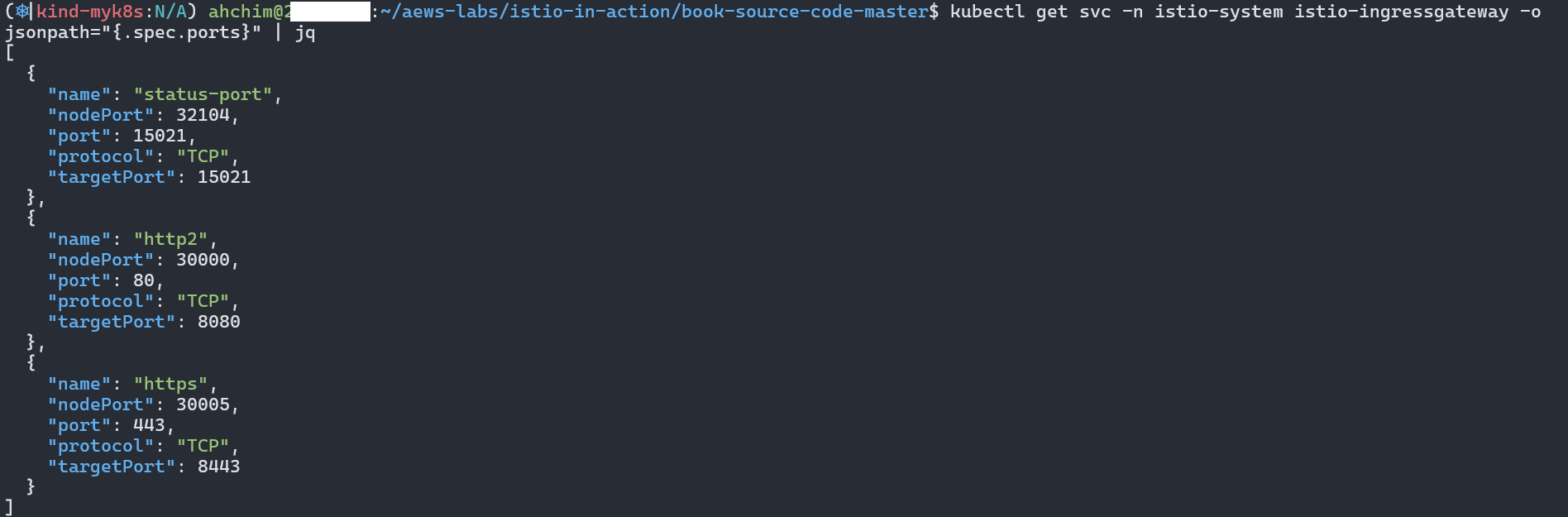
적용 직후, Envoy에 라우트 정보가 반영되며 블랙홀 라우트 상태가 확인되었다.

3. VirtualService 리소스를 통한 라우팅 설정
Gateway만으로는 외부 트래픽이 목적지까지 도달할 수 없다. 트래픽의 목적지를 명시하는 VirtualService 리소스를 추가해야 한다.
- VirtualService 리소스는 클라이언트가 특정 서비스와 통신하는 방법을 정의
- FQDN, 사용 가능한 서비스 버전, 기타 라우팅 속성(재시도, 요청 타임아웃 등)

- FQDN, 사용 가능한 서비스 버전, 기타 라우팅 속성(재시도, 요청 타임아웃 등)
- 가상 호스트 webapp.istioinaction.io 로 향하는 트래픽을 서비스 메시 내에 배포된 서비스로 라우팅
apiVersion: networking.istio.io/v1alpha3
kind: VirtualService
metadata:
  name: webapp-vs-from-gw
spec:
  hosts:
  - "webapp.istioinaction.io"
  gateways:
  - coolstore-gateway
  http:
  - route:
    - destination:
        host: webapp
        port:
          number: 80
리소스 생성 및 확인
# 신규터미널 : istiod 로그
kubectl stern -n istio-system -l app=istiod
istiod-7df6ffc78d-w9szx discovery 2025-04-13T05:15:16.485143Z	info	ads	Push debounce stable[21] 1 for config VirtualService/istioinaction/webapp-vs-from-gw: 102.17225ms since last change, 102.172083ms since last push, full=true
istiod-7df6ffc78d-w9szx discovery 2025-04-13T05:15:16.485918Z	info	ads	XDS: Pushing:2025-04-13T05:15:16Z/15 Services:12 ConnectedEndpoints:1 Version:2025-04-13T05:15:16Z/15
istiod-7df6ffc78d-w9szx discovery 2025-04-13T05:15:16.487330Z	info	ads	CDS: PUSH for node:istio-ingressgateway-996bc6bb6-p6k79.istio-system resources:23 size:22.9kB cached:22/22
istiod-7df6ffc78d-w9szx discovery 2025-04-13T05:15:16.488346Z	info	ads	LDS: PUSH for node:istio-ingressgateway-996bc6bb6-p6k79.istio-system resources:1 size:2.2kB
istiod-7df6ffc78d-w9szx discovery 2025-04-13T05:15:16.489937Z	info	ads	RDS: PUSH for node:istio-ingressgateway-996bc6bb6-p6k79.istio-system resources:1 size:538B cached:0/0


#
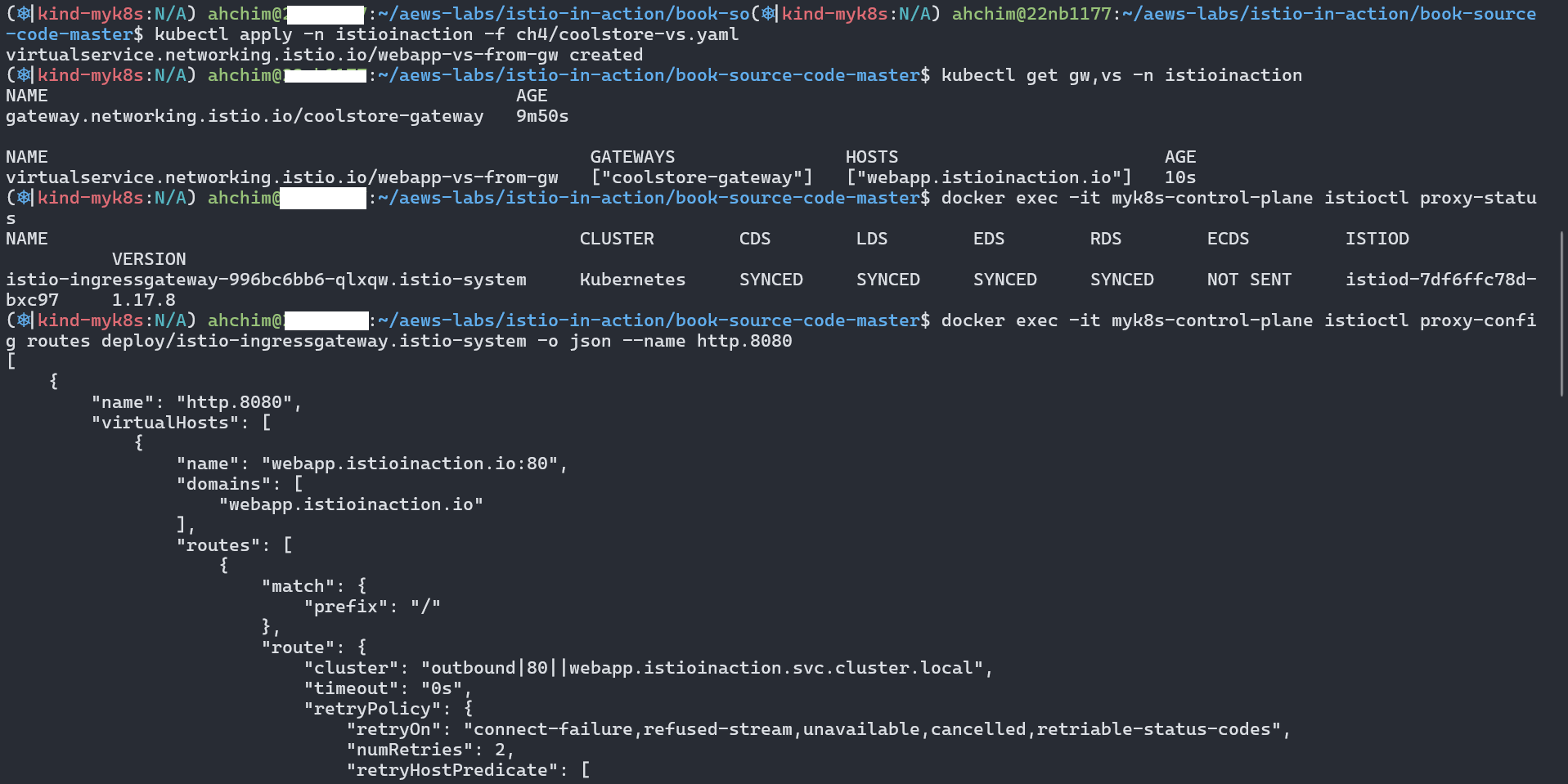
cat ch4/coolstore-vs.yaml
kubectl apply -n istioinaction -f ch4/coolstore-vs.yaml

# 확인
kubectl get gw,vs -n istioinaction
NAME                                            AGE
gateway.networking.istio.io/coolstore-gateway   26m

NAME                                                   GATEWAYS                HOSTS                         AGE
virtualservice.networking.istio.io/webapp-vs-from-gw   ["coolstore-gateway"]   ["webapp.istioinaction.io"]   49s

#
docker exec -it myk8s-control-plane istioctl proxy-status
NAME                                                  CLUSTER        CDS        LDS        EDS        RDS        ECDS         ISTIOD                      VERSION
istio-ingressgateway-996bc6bb6-p6k79.istio-system     Kubernetes     SYNCED     SYNCED     SYNCED     SYNCED     NOT SENT     istiod-7df6ffc78d-w9szx     1.17.8

docker exec -it myk8s-control-plane istioctl proxy-config listener deploy/istio-ingressgateway.istio-system
docker exec -it myk8s-control-plane istioctl proxy-config routes deploy/istio-ingressgateway.istio-system
NAME          DOMAINS     MATCH                  VIRTUAL SERVICE
http.8080     webapp.istioinaction.io     /*                     webapp-vs-from-gw.istioinaction
...

docker exec -it myk8s-control-plane istioctl proxy-config routes deploy/istio-ingressgateway.istio-system -o json --name http.8080
[
    {
        "name": "http.8080",
        "virtualHosts": [
            {
                "name": "webapp.istioinaction.io:80",
                "domains": [
                    "webapp.istioinaction.io" #1 비교할 도메인
                ],
                "routes": [
                    {
                        "match": {
                            "prefix": "/"
                        },
                        "route": { #2 라우팅 할 곳
                            "cluster": "outbound|80||webapp.istioinaction.svc.cluster.local",
                            "timeout": "0s",
                            "retryPolicy": {
                                "retryOn": "connect-failure,refused-stream,unavailable,cancelled,retriable-status-codes",
                                "numRetries": 2,
                                "retryHostPredicate": [
                                    {
                                        "name": "envoy.retry_host_predicates.previous_hosts",
                                        "typedConfig": {
                                            "@type": "type.googleapis.com/envoy.extensions.retry.host.previous_hosts.v3.PreviousHostsPredicate"
                                        }
                                    }
                                ],
                                "hostSelectionRetryMaxAttempts": "5",
                                "retriableStatusCodes": [
                                    503
                                ]
                            },
                            "maxGrpcTimeout": "0s"
                        },
                        "metadata": {
                            "filterMetadata": {
                                "istio": {
                                    "config": "/apis/networking.istio.io/v1alpha3/namespaces/istioinaction/virtual-service/webapp-vs-from-gw"
                                }
                            }
                        },
                        "decorator": {
                            "operation": "webapp.istioinaction.svc.cluster.local:80/*"
                        }
                    }
                ],
                "includeRequestAttemptCount": true
            }
        ],
        "validateClusters": false,
        "ignorePortInHostMatching": true
    }
]

# 실제 애플리케이션(서비스)를 배포 전으로 cluster 에 webapp, catalog 정보가 없다.
docker exec -it myk8s-control-plane istioctl proxy-config cluster deploy/istio-ingressgateway.istio-system
...
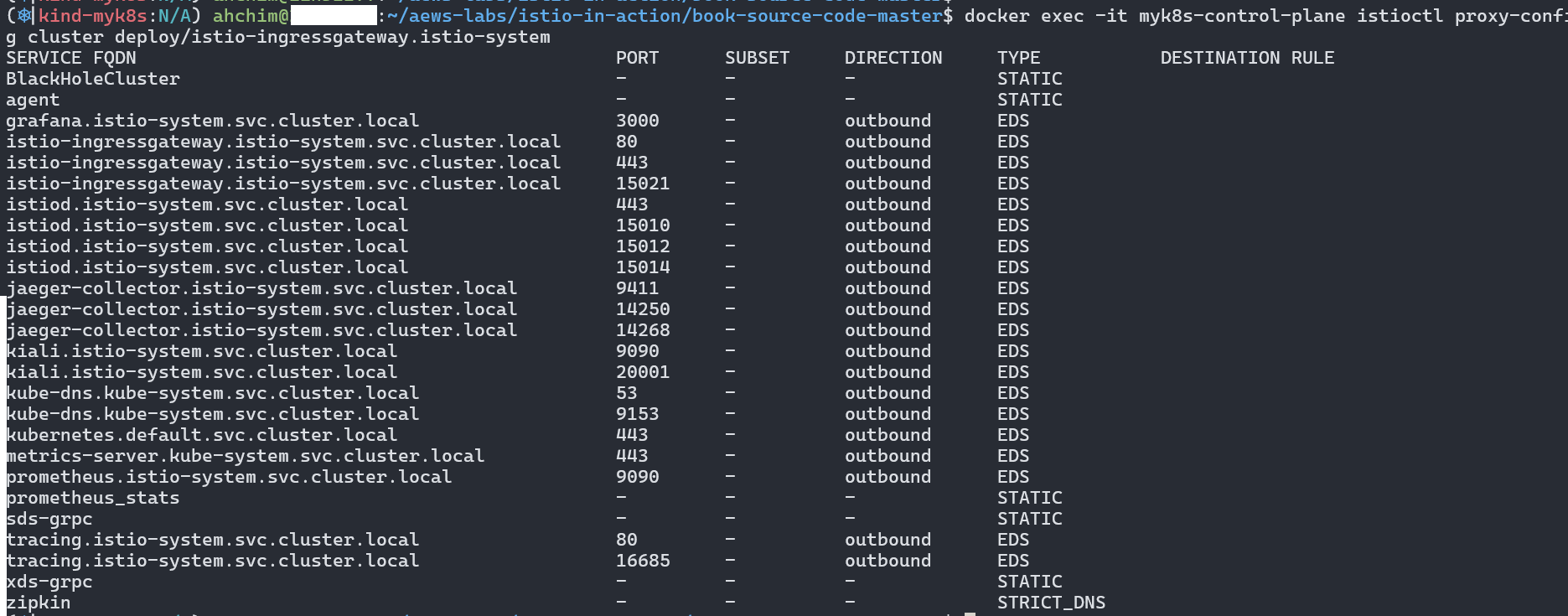
VirtualService 적용 후에는 Envoy가 도메인을 기반으로 라우팅을 수행하도록 구성되며, 실제 라우트 엔트리가 확인되었다.
docker exec -it myk8s-control-plane istioctl proxy-config routes deploy/istio-ingressgateway.istio-system -o json --name http.8080
4. 서비스 배포: webapp과 catalog
실제 애플리케이션을 배포해보자.
# 로그
kubectl stern -n istioinaction -l app=webapp
kubectl stern -n istioinaction -l app=catalog
kubectl stern -n istio-system -l app=istiod
istiod-7df6ffc78d-w9szx discovery 2025-04-13T05:59:52.736261Z	info	ads	LDS: PUSH request for node:webapp-7685bcb84-mck2d.istioinaction resources:21 size:50.1kB
istiod-7df6ffc78d-w9szx discovery 2025-04-13T05:59:52.749641Z	info	ads	RDS: PUSH request for node:webapp-7685bcb84-mck2d.istioinaction resources:13 size:9.9kB cached:12/13
istiod-7df6ffc78d-w9szx discovery 2025-04-13T05:59:54.076322Z	info	ads	CDS: PUSH for node:webapp-7685bcb84-mck2d.istioinaction resources:28 size:26.4kB cached:22/24
istiod-7df6ffc78d-w9szx discovery 2025-04-13T05:59:54.076489Z	info	ads	EDS: PUSH for node:webapp-7685bcb84-mck2d.istioinaction resources:24 size:4.0kB empty:0 cached:24/24
istiod-7df6ffc78d-w9szx discovery 2025-04-13T05:59:54.078289Z	info	ads	LDS: PUSH for node:webapp-7685bcb84-mck2d.istioinaction resources:21 size:50.1kB
istiod-7df6ffc78d-w9szx discovery 2025-04-13T05:59:54.078587Z	info	ads	RDS: PUSH for node:webapp-7685bcb84-mck2d.istioinaction resources:13 size:9.9kB cached:12/13
istiod-7df6ffc78d-w9szx discovery 2025-04-13T05:59:54.185611Z	info	ads	Push debounce stable[37] 1 for config ServiceEntry/istioinaction/webapp.istioinaction.svc.cluster.local: 100.490667ms since last change, 100.490459ms since last push, full=false
...

# 배포
cat services/catalog/kubernetes/catalog.yaml
cat services/webapp/kubernetes/webapp.yaml
kubectl apply -f services/catalog/kubernetes/catalog.yaml -n istioinaction
kubectl apply -f services/webapp/kubernetes/webapp.yaml -n istioinaction

# 확인
kubectl get pod -n istioinaction -owide
NAME                     READY   STATUS    RESTARTS   AGE
catalog-6cf4b97d-nwh9w   2/2     Running   0          10m
webapp-7685bcb84-mck2d   2/2     Running   0          10m

# krew plugin images 설치 후 사용
kubectl images -n istioinaction
[Summary]: 1 namespaces, 2 pods, 6 containers and 3 different images
+------------------------+-------------------+--------------------------------+
|          Pod           |     Container     |             Image              |
+------------------------+-------------------+--------------------------------+
| catalog-6cf4b97d-nwh9w | catalog           | istioinaction/catalog:latest   |
+                        +-------------------+--------------------------------+
|                        | istio-proxy       | docker.io/istio/proxyv2:1.17.8 |
+                        +-------------------+                                +
|                        | (init) istio-init |                                |
+------------------------+-------------------+--------------------------------+
| webapp-7685bcb84-mck2d | webapp            | istioinaction/webapp:latest    |
+                        +-------------------+--------------------------------+
|                        | istio-proxy       | docker.io/istio/proxyv2:1.17.8 |
+                        +-------------------+                                +
|                        | (init) istio-init |                                |
+------------------------+-------------------+--------------------------------+

# krew plugin resource-capacity 설치 후 사용 : istioinaction 네임스페이스에 파드에 컨테이너별 CPU/Mem Request/Limit 확인
kubectl resource-capacity -n istioinaction -c --pod-count
kubectl resource-capacity -n istioinaction -c --pod-count -u
NODE                  POD                      CONTAINER     CPU REQUESTS   CPU LIMITS    CPU UTIL   MEMORY REQUESTS   MEMORY LIMITS   MEMORY UTIL   POD COUNT

myk8s-control-plane   *                        *             200m (2%)      4000m (50%)   9m (0%)    256Mi (2%)        2048Mi (17%)    129Mi (1%)    2/110
myk8s-control-plane   catalog-6cf4b97d-m7jq9   *             100m (1%)      2000m (25%)   5m (0%)    128Mi (1%)        1024Mi (8%)     70Mi (0%)
myk8s-control-plane   catalog-6cf4b97d-m7jq9   catalog       0m (0%)        0m (0%)       0m (0%)    0Mi (0%)          0Mi (0%)        22Mi (0%)
myk8s-control-plane   catalog-6cf4b97d-m7jq9   istio-proxy   100m (1%)      2000m (25%)   5m (0%)    128Mi (1%)        1024Mi (8%)     48Mi (0%)
...

#
docker exec -it myk8s-control-plane istioctl proxy-status
NAME                                                  CLUSTER        CDS        LDS        EDS        RDS        ECDS         ISTIOD                      VERSION
istio-ingressgateway-996bc6bb6-p6k79.istio-system     Kubernetes     SYNCED     SYNCED     SYNCED     SYNCED     NOT SENT     istiod-7df6ffc78d-w9szx     1.17.8
catalog-6cf4b97d-nwh9w.istioinaction                  Kubernetes     SYNCED     SYNCED     SYNCED     SYNCED     NOT SENT     istiod-7df6ffc78d-w9szx     1.17.8
webapp-7685bcb84-mck2d.istioinaction                  Kubernetes     SYNCED     SYNCED     SYNCED     SYNCED     NOT SENT     istiod-7df6ffc78d-w9szx     1.17.8

docker exec -it myk8s-control-plane istioctl proxy-config listener deploy/istio-ingressgateway.istio-system
docker exec -it myk8s-control-plane istioctl proxy-config cluster deploy/istio-ingressgateway.istio-system | egrep 'TYPE|istioinaction'
SERVICE FQDN                                            PORT      SUBSET     DIRECTION     TYPE           DESTINATION RULE
catalog.istioinaction.svc.cluster.local                 80        -          outbound      EDS
webapp.istioinaction.svc.cluster.local                  80        -          outbound      EDS

# istio-ingressgateway 에서 catalog/webapp 의 Service(ClusterIP)로 전달하는게 아니라, 바로 파드 IP인 Endpoint 로 전달함.
## 즉, istio 를 사용하지 않았다면, Service(ClusterIP) 동작 처리를 위해서 Node에 iptable/conntrack 를 사용했었어야 하지만,
## istio 사용 시에는 Node에 iptable/conntrack 를 사용하지 않아서, 이 부분에 대한 통신 라우팅 효율이 있다.
docker exec -it myk8s-control-plane istioctl proxy-config endpoint deploy/istio-ingressgateway.istio-system | egrep 'ENDPOINT|istioinaction'
ENDPOINT                                                STATUS      OUTLIER CHECK     CLUSTER
10.10.0.18:3000                                         HEALTHY     OK                outbound|80||catalog.istioinaction.svc.cluster.local
10.10.0.19:8080                                         HEALTHY     OK                outbound|80||webapp.istioinaction.svc.cluster.local

#
docker exec -it myk8s-control-plane istioctl proxy-config listener deploy/webapp.istioinaction
docker exec -it myk8s-control-plane istioctl proxy-config routes deploy/webapp.istioinaction
docker exec -it myk8s-control-plane istioctl proxy-config cluster deploy/webapp.istioinaction
docker exec -it myk8s-control-plane istioctl proxy-config endpoint deploy/webapp.istioinaction
docker exec -it myk8s-control-plane istioctl proxy-config secret deploy/webapp.istioinaction
docker exec -it myk8s-control-plane istioctl proxy-config endpoint deploy/webapp.istioinaction | egrep 'ENDPOINT|istioinaction'
ENDPOINT                                                STATUS      OUTLIER CHECK     CLUSTER
10.10.0.18:3000                                         HEALTHY     OK                outbound|80||catalog.istioinaction.svc.cluster.local
10.10.0.19:8080                                         HEALTHY     OK                outbound|80||webapp.istioinaction.svc.cluster.local

# 현재 모든 istio-proxy 가 EDS로 K8S Service(Endpoint) 정보를 알 고 있다
docker exec -it myk8s-control-plane istioctl proxy-config listener deploy/catalog.istioinaction
docker exec -it myk8s-control-plane istioctl proxy-config routes deploy/catalog.istioinaction
docker exec -it myk8s-control-plane istioctl proxy-config cluster deploy/catalog.istioinaction
docker exec -it myk8s-control-plane istioctl proxy-config endpoint deploy/catalog.istioinaction
docker exec -it myk8s-control-plane istioctl proxy-config secret deploy/catalog.istioinaction
docker exec -it myk8s-control-plane istioctl proxy-config endpoint deploy/catalog.istioinaction | egrep 'ENDPOINT|istioinaction'
ENDPOINT                                                STATUS      OUTLIER CHECK     CLUSTER
10.10.0.18:3000                                         HEALTHY     OK                outbound|80||catalog.istioinaction.svc.cluster.local
10.10.0.19:8080                                         HEALTHY     OK                outbound|80||webapp.istioinaction.svc.cluster.local

# netshoot로 내부에서 catalog 접속 확인
kubectl exec -it netshoot -- curl -s http://catalog.istioinaction/items/1 | jq
{
  "id": 1,
  "color": "amber",
  "department": "Eyewear",
  "name": "Elinor Glasses",
  "price": "282.00"
}

# netshoot로 내부에서 webapp 접속 확인 : 즉 webapp은 다른 백엔드 서비스의 파사드 facade 역할을 한다.
kubectl exec -it netshoot -- curl -s http://webapp.istioinaction/api/catalog/items/1 | jq
{
  "id": 1,
  "color": "amber",
  "department": "Eyewear",
  "name": "Elinor Glasses",
  "price": "282.00"
}
webapp과 catalog 서비스는 다음과 같이 배포하였다.
kubectl apply -f services/catalog/kubernetes/catalog.yaml -n istioinaction
kubectl apply -f services/webapp/kubernetes/webapp.yaml -n istioinaction
두 서비스는 각각 2개의 컨테이너(서비스, istio-proxy)를 포함하고 있다.
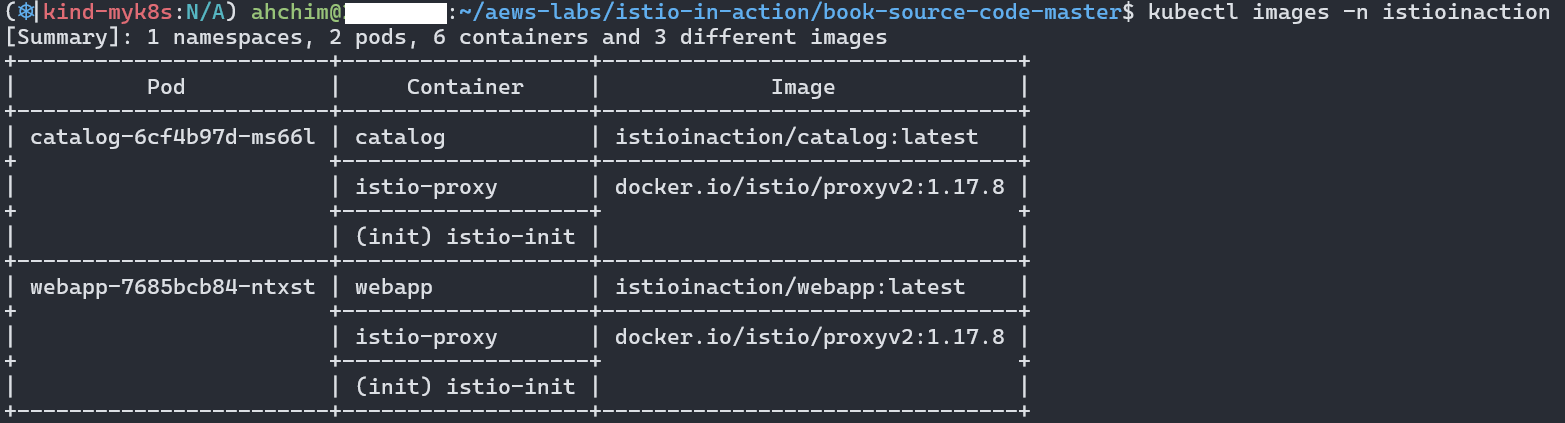
리소스 요청과 사용률은 kubectl resource-capacity로 확인하였다.
kubectl resource-capacity -n istioinaction -c --pod-count

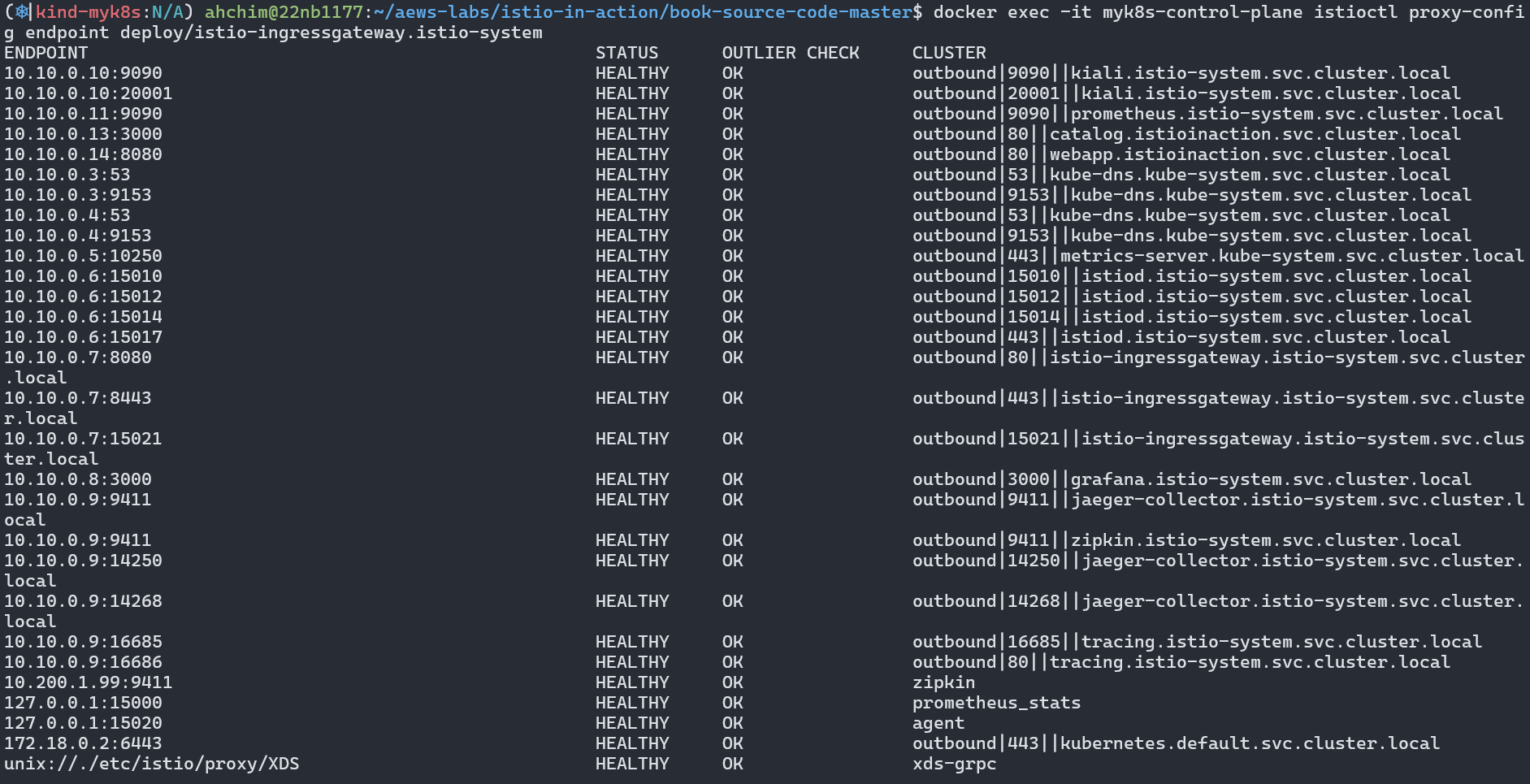
또한, Envoy는 EDS를 통해 해당 서비스의 Endpoint 정보를 실시간으로 수신하고 있었다.
docker exec -it myk8s-control-plane istioctl proxy-config endpoint deploy/istio-ingressgateway.istio-system
5. 실제 요청 테스트 및 디버깅
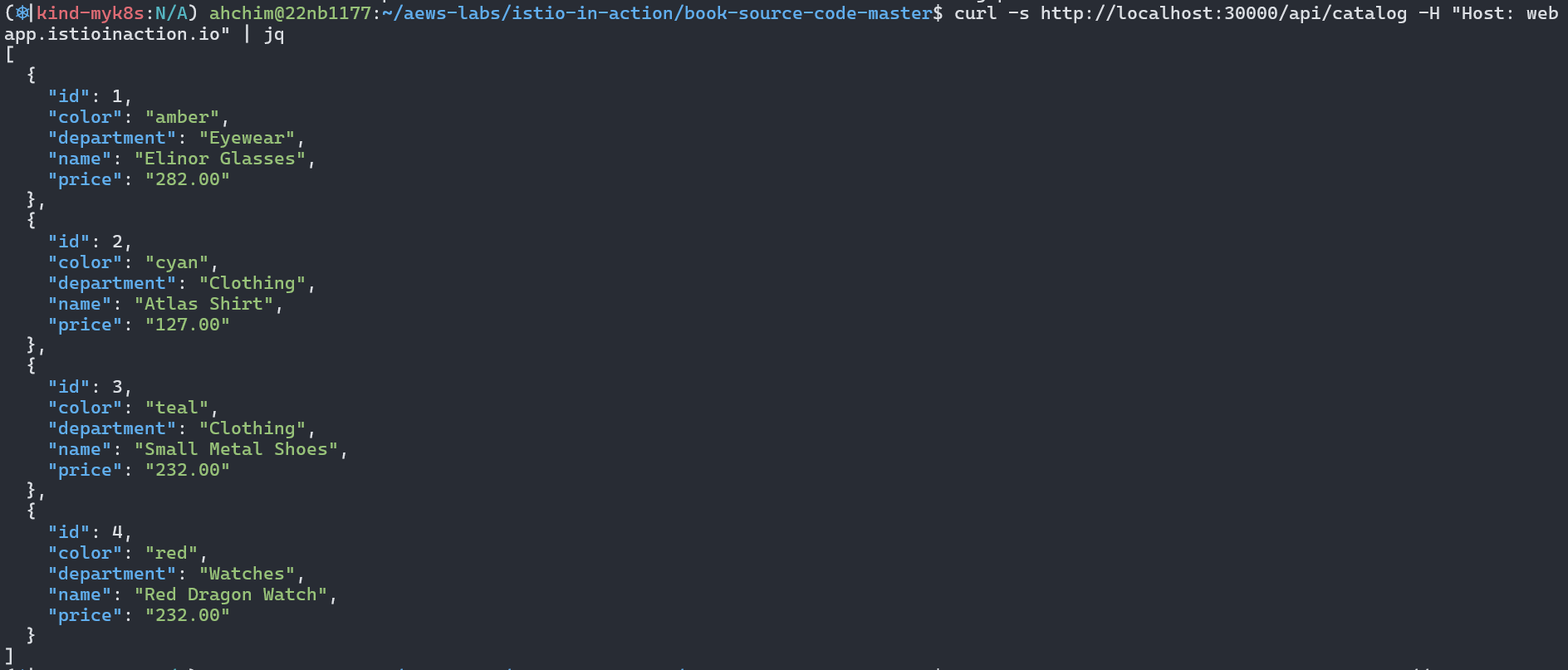
웹에서 직접 요청을 테스트하기 위해 curl 명령어를 사용하였다.
curl -s http://localhost:30000/api/catalog -H "Host: webapp.istioinaction.io" | jq
정상적으로 Elinor Glasses가 포함된 JSON 응답을 수신했다.
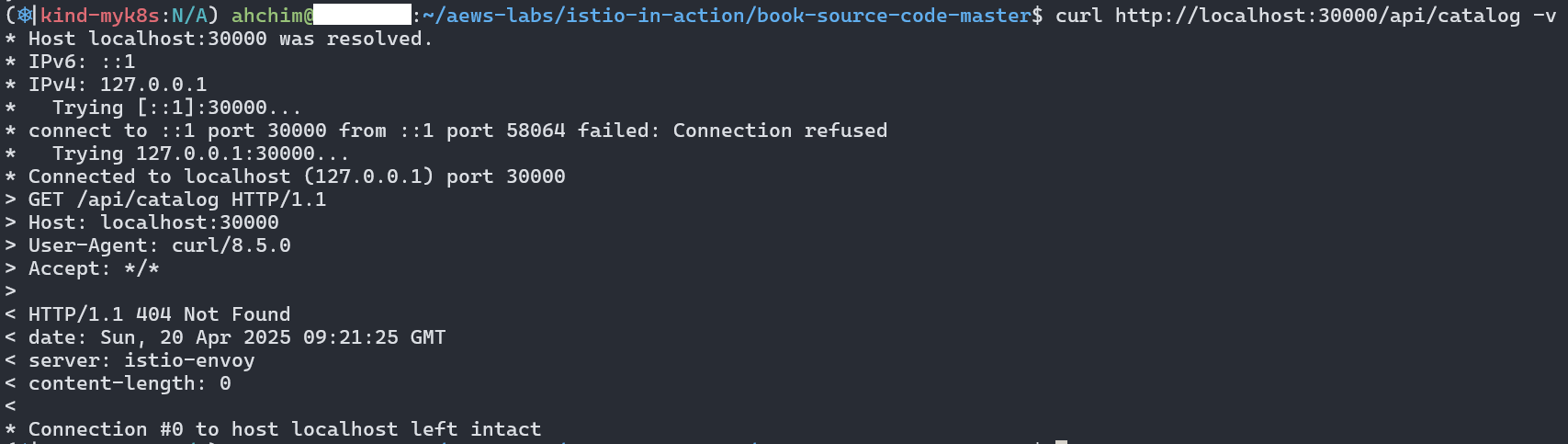
반대로 Host 헤더 없이 요청할 경우 404가 반환되었다. (Envoy가 도메인을 기준으로 라우팅하기 때문)
curl http://localhost:30000/api/catalog -v
이번에는 netshoot로 내부에서 catalog 및 webapp 접속을 확인하였다.
kubectl exec -it netshoot -- curl -s http://catalog.istioinaction/items/1 | jq
kubectl exec -it netshoot -- curl -s http://webapp.istioinaction/items/1 | jq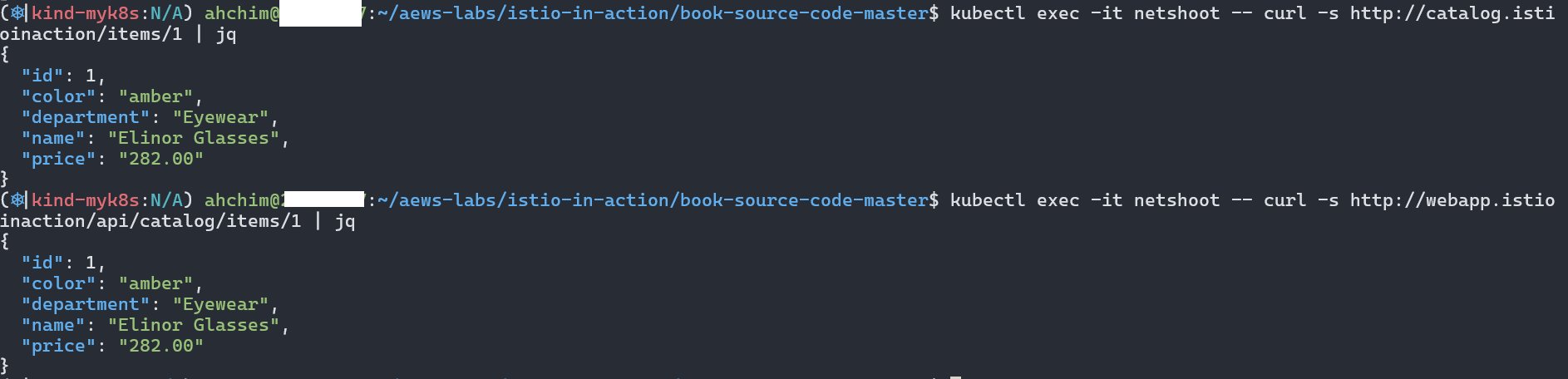
즉 webapp은 다른 백엔드 서비스의 파사드 facade 역할을 한다.
6. mTLS 인증서 확인
webapp과 catalog의 사이드카 프록시에서 인증서를 확인하였다.
Envoy 관리 포트(15000)을 통해 인증서를 확인하고, base64 디코딩을 통해 유효기간 및 SAN 정보를 확인할 수 있었다.
kubectl exec -it deploy/webapp -n istioinaction -c istio-proxy -- curl http://localhost:15000/certs | jq
만료일자는 1day 서비스 인증서와 10y 루트 인증서로 구분되었다.
7. Endpoint 확장 확인 및 최적화 고찰
catalog, webapp 에 replicas=1 → 2로 증가 후 istio EDS(Endpoint) 정보 확인
# 로그 모니터링
kubectl stern -n istio-system -l app=istiod

# catalog, webapp 에 replicas=1 → 2로 증가
kubectl scale deployment -n istioinaction webapp --replicas 2
kubectl scale deployment -n istioinaction catalog --replicas 2

# 모든 istio-proxy 가 EDS로 해당 K8S Service의 Endpoint 목록 정보 동기화되어 알고 있음을 확인
docker exec -it myk8s-control-plane istioctl proxy-config endpoint deploy/istio-ingressgateway.istio-system | egrep 'ENDPOINT|istioinaction'
docker exec -it myk8s-control-plane istioctl proxy-config endpoint deploy/webapp.istioinaction | egrep 'ENDPOINT|istioinaction'
docker exec -it myk8s-control-plane istioctl proxy-config endpoint deploy/catalog.istioinaction | egrep 'ENDPOINT|istioinaction'
ENDPOINT                                                STATUS      OUTLIER CHECK     CLUSTER
10.10.0.13:3000                                         HEALTHY     OK                outbound|80||catalog.istioinaction.svc.cluster.local
10.10.0.14:8080                                         HEALTHY     OK                outbound|80||webapp.istioinaction.svc.cluster.local
10.10.0.15:8080                                         HEALTHY     OK                outbound|80||webapp.istioinaction.svc.cluster.local
10.10.0.16:3000                                         HEALTHY     OK                outbound|80||catalog.istioinaction.svc.cluster.local

# 다음 실습을 위해서 catalog, webapp 에 replicas=2 → 1로 감소 해두기
kubectl scale deployment -n istioinaction webapp --replicas 1
kubectl scale deployment -n istioinaction catalog --replicas 1
replicas=2로 확장 후, 각 Envoy proxy가 새로운 Endpoint 정보를 정확히 인식하고 있는지도 확인하였다.
kubectl scale deployment -n istioinaction webapp --replicas 2
kubectl scale deployment -n istioinaction catalog --replicas 2

docker exec -it myk8s-control-plane istioctl proxy-config endpoint deploy/istio-ingressgateway.istio-system | egrep 'ENDPOINT|istioinaction'
docker exec -it myk8s-control-plane istioctl proxy-config endpoint deploy/webapp.istioinaction | egrep 'ENDPOINT|istioinaction'
docker exec -it myk8s-control-plane istioctl proxy-config endpoint deploy/catalog.istioinaction | egrep 'ENDPOINT|istioinaction'
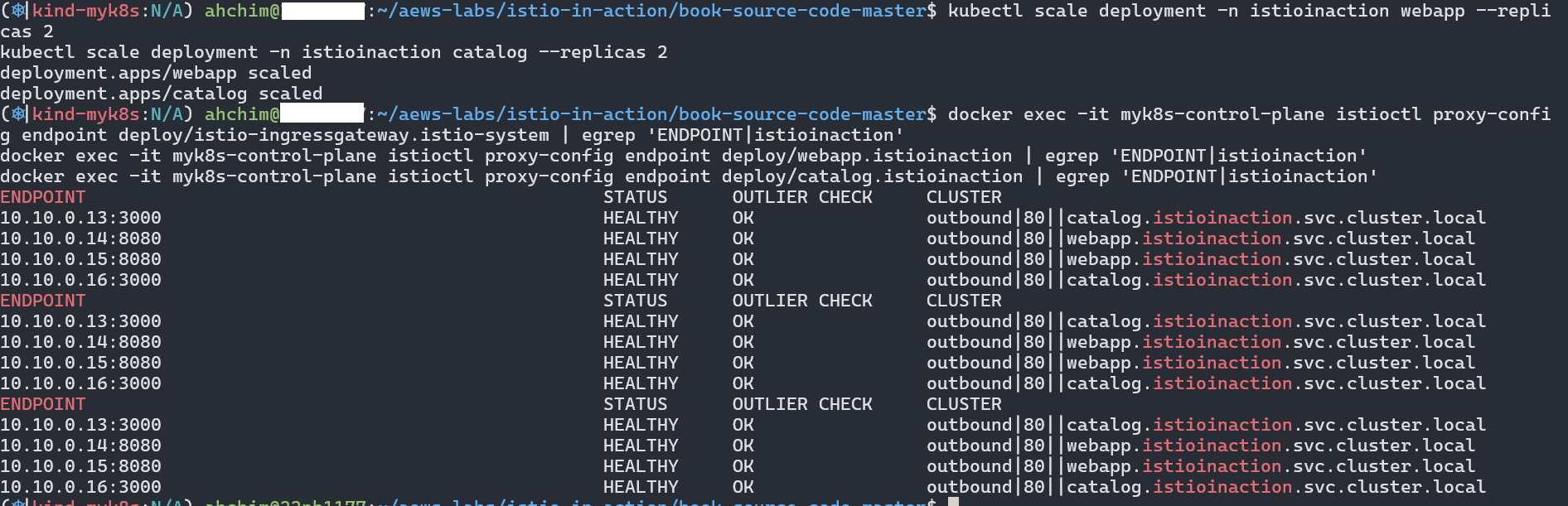
istio EDS 정보를 확인하면 엔드포인트가 각각 두개 씩 설정되어 있는 것을 확인할 수 있었다.
'Service_Mesh > Istio' 카테고리의 다른 글
| [Istio-3주차] Resilience (이론, 실습) (0) | 2025.04.27 |
|---|---|
| [Istio-3주차] Traffic control (이론, 실습) (0) | 2025.04.27 |
| [Istio-2주차] Envoy in action (실습) (0) | 2025.04.20 |
| [Istio-2주차] Istio Gateway (이론) (0) | 2025.04.20 |
| [Istio-2주차] Envoy (이론) (0) | 2025.04.20 |
Contents
소중한 공감 감사합니다.